Company team
The Company Team permission management includes all members of your company. Depending on the assigned role, members can manage the company and its assets.
You can invite, remove, and assign roles to users from your company, and to users from other companies.
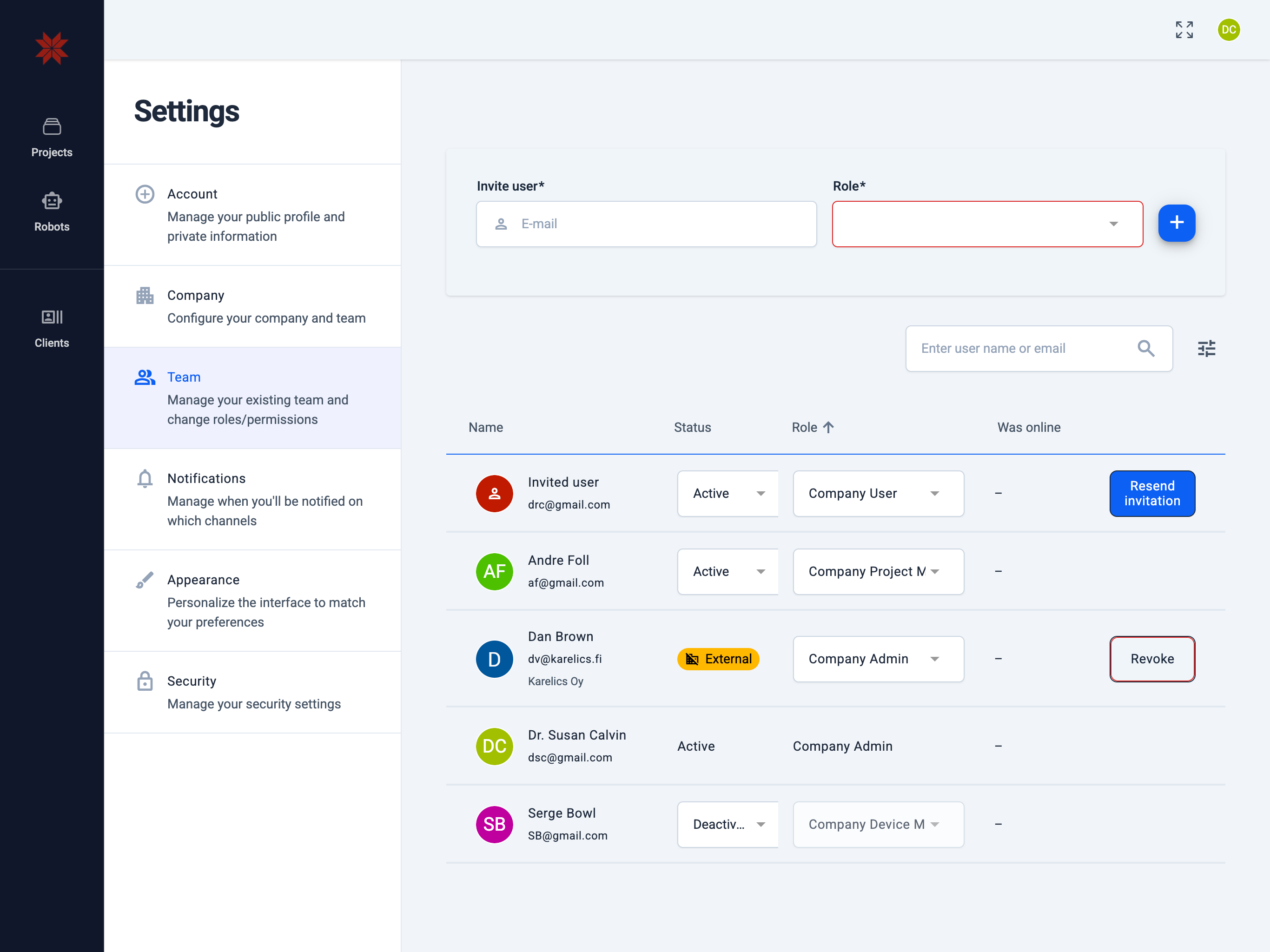
Adding a new company user
- In the Invite user field, enter the full email address of the user.
- In the Role dropdown, select the user role.
- Click the add button to add the user.
Managing company users
- search - Search users.
- tune - Filter by active and deactivated users.
- Name column
- Displays the user's name, email address, and, if applicable, the company name (for external users).
- If the entry shows 'Invited user', it means the invitation has been sent but not yet accepted.
- Status column
- Active – active user (can be deactivated).
- Deactive – user removed from your company (can be reactivated).
- External – user belongs to another company registered in Karelics Cloud.
- Role column – current role of the user, which can be changed.
- Was online column – last time the user was active in the system.
- Resend invitation button – re‑send the invitation to a user.
- Revoke button – withdraw the invitation sent to an external user.
What each role can do
- Company Admin
- Create & manage new projects.
- Manage devices and users.
- Company Project Manager
- View company information and company devices.
- Create & manage new projects.
- Assign devices to projects.
- Company Device Manager
- View company information and company devices.
- Assign devices to projects.
- Manage company devices.
- Company User
- View company information and company devices.
- Company Guest
- Cannot read company information.
Detailed user permissions
| Role (description) | Create project | Read company | Update company | Manage users | Invite users | Read devices | Assign device to project | Manage devices | Manage device types | Change device ownership | Manage clients |
|---|---|---|---|---|---|---|---|---|---|---|---|
| Company Admin | ✅ | ✅ | ✅ | ✅ | ✅ | ✅ | ✅ | ✅ | ✅ | ✅ | ✅ |
| Company Project Manager | ✅ | ✅ | – | – | – | ✅ | ✅ | – | – | – | – |
| Company Device Manager | – | ✅ | – | – | – | ✅ | ✅ | ✅ | – | – | – |
| Company User | – | ✅ | – | – | – | ✅ | – | – | – | – | – |
| Company Guest | – | – | – | – | – | – | – | – | – | – | – |