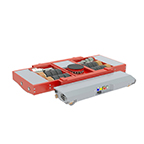
Technical specifications
The JUNG JLA-e 5/12 G is a battery-powered self-propelled transport trolley. Karelics integrates it with Brain (on-robot autonomy, trailer mode, lift control, SICK lidar) and Cloud (fleet management, missions, battery monitoring).
Platform specifications (manufacturer)
Values below are from the JUNG product datasheet. Verify against your delivered unit.
Load and towing:
- Load capacity: 5 t
- Pulling capacity: 12 t
- Lift stroke (G with lift): 50 mm
Performance:
- Speed: up to 10 m/min
- Runtime: 4–5 h (manufacturer rating under ideal conditions)
Dimensions:
- Platform: 975 × 900 mm (with lift variant)
- Installation height: 180 mm
- Turntable support surface: Ø 170 mm
- Weight with battery: ~205 kg
Power:
- LiFePO4 battery with charger
- Radio remote control (replaced by Karelics Cloud for fleet operation)
Karelics integration hardware
From the Karelics–JUNG integration requirements (July 2024). Exact BOM may vary per deployment.
| Component | Role |
|---|---|
| Intel NUC10 (Core i7-10710U, 16 GB RAM, 500 GB SSD) | On-robot Brain computer |
| 24 V → 19 V converter (≥ 6 A) | Powers NUC from JUNG breadboard (pins X1.8, X1.10) |
| RPLidar S3 or SICK safety lidar | Navigation / safety sensing (e.g. SICK nanoScan3) |
| Seeed EdgeBox ESP-100 | Lift control interface |
| USB2CAN (Ixxat) + CAN bus | Engel motor drives (CANopen node 02 left, 03 right) |
| DualShock 4 (PS4) controller | Manual control |
| Intel RealSense D457 (optional) | Camera for remote teleoperation |
Power and wiring: Karelics installs Brain software on the NUC. RPLidar uses two USB cables (power + data); SICK lidar uses Ethernet to the NUC. Motors are configured via Engel DServ (RS232) for CANopen, then linked through CAN tees with termination to the USB2CAN adapter.
Lift: ESP-100 is flashed with Karelics firmware and connected to the NUC via Ethernet. See GitLab: karelics/ros/jung, karelics/ros/karelics_esp_100_driver.
Karelics Cloud configuration
In Karelics Cloud the robot model alias is jla_5_12_g. The on-robot Brain configuration folder in karelics-robot-config is jung — the folder name must match the Cloud model alias for automated deployment (AWX).
Karelics software capabilities
| Area | Capability |
|---|---|
| Autonomy | Mapping, autonomous drive, virtual locations, go to charger |
| Trailer | Pick-up, navigation with trailer, drop-off |
| Lift | Lift up/down from Cloud UI |
| Safety | SICK lidar (slow + stop zones), no-go zones, virtual walls |
| Fleet | Multiple robots on one project/map, health monitoring, usage analytics |
| Manual | PS4 controller; remote teleoperation when camera equipped |

See Safety rules and Brain releases for operational detail and software updates.